
Payouts: card payments, refunds and disputes
This page shows every card payment of the event. You see what came in, what Moostoo kept, what was refunded or disputed, and when the money reaches your bank. Use it to answer how much you actually receive, and to refund a card payment.
How it works
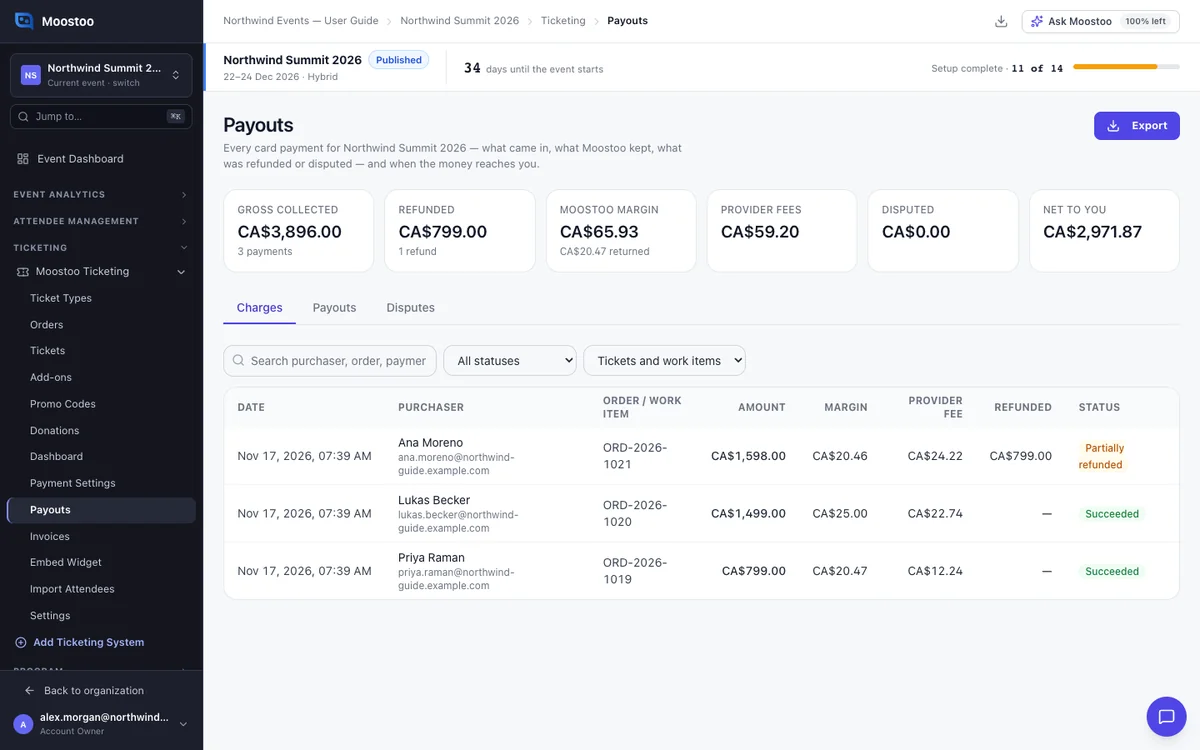
The summary
You need the event's Manage financials permission to open this page. The cards at the top show:
- Gross collected
- Refunded
- Moostoo margin
- Provider fees
- Disputed
- Net to you
They follow the same filter as the table. Test payments are never counted. Work items paid by card appear here too.
Charges
One row per card payment, with its amount, margin, refunds and status. Click a row to see the details and refund it.
Payouts
If the money goes to your own payment account, this tab shows the payouts your provider reports.
If Moostoo collects the money for you, Moostoo pays you by bank transfer after the event ends, plus a few hold days. Each payout shows gross, margin, refunds and the net amount.
Scheduled The payout is planned.
Held You have not entered a bank account yet, or a payment in it is disputed.
Transfer pending The amount is final and Moostoo is sending it.
Sending to your bank The transfer is on its way through Moostoo's Wise account.
Paid The money was sent. The bank's reference is shown.
Failed The transfer did not go through.
Each payout has a Statement of what was collected and paid. It also has Moostoo's fee invoice for the margin it kept. Both are PDFs.
Disputes
A dispute is a payment the buyer's bank questioned. You see its reason, amount and deadline.
On your own account, you answer it here. If Moostoo collects for you, Moostoo answers it, and the amount is held out of your payout until it is decided.
Good to know
- A payout is never negative. A shortfall, or a refund made after the payout is final, shows as Balance owed and comes off the next payout.
- When Moostoo sends payouts through Wise, an Account Owner or Super User sees Send to my bank now on a payout that is Transfer pending.
- Payouts are not made early. Moostoo pays only after the event and the hold days.
Step by step
Refund a card payment
Open Ticketing → Payouts and find the payment. Search by buyer, order number or payment id.
Click the payment to open its panel.
Enter the amount to refund and an optional reason, then click Refund….
Check the confirmation and click Refund.
It shows how much goes back to the buyer and how much margin Moostoo returns.
Pending refunds
Some providers confirm a refund later. Mollie always does. The refund shows as Pending, and the order changes once the provider confirms it.
Where the margin goes on a refund
On your own Stripe account, the margin is returned with the refund. On your own Mollie account, it comes back as a credit taken off your next Mollie payments. If Moostoo collects for you, it is not deducted from your payout.
What cannot be refunded
A disputed payment cannot be refunded until the dispute is decided. You also cannot refund more than what is left.
What attendees see
In the attendee app
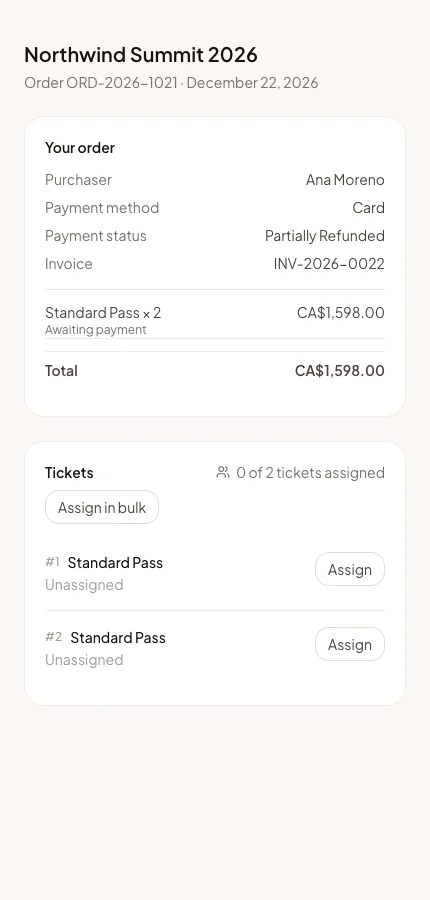
The buyer gets the money back on the card they paid with. Their order page shows the payment as Refunded or Partially refunded. A refunded ticket is refused at the door.
Tips
- Export gives your accountant every charge and payout as CSV or Excel. Times are on the event's clock.
- Refunding from the order on Orders does the same as refunding here.
- If Moostoo collects for you, enter your bank account early. A payout without one is held.