
Badge codes
At the door, a badge is only as good as the code on it. Moostoo gives every attendee exactly one scannable code, decided by a simple rule you can see on their record. Knowing the rule lets you keep tickets from an outside platform working, keep codes printed by another badging company scannable, and fix a badge that will not scan — without guessing.
How it works
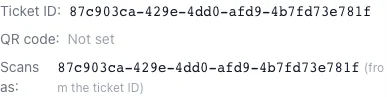
Ticket ID The ticket this attendee holds. For a ticket sold in Moostoo it is that ticket's own identifier, written when the ticket is assigned to them. For a ticket imported from a platform such as Eventbrite, Swoogo, Tito or Lu.ma it is that platform's ticket or registration ID. There is one identifier field — Moostoo has no separate registration number.
QR Code An optional override. When set, it wins over the Ticket ID: it is what the badge encodes and what the scanner looks for. Use it to keep codes issued by an outside badging system scannable.
Scans as The code the badge actually carries: the QR Code if set, otherwise the Ticket ID, otherwise the attendee's internal identifier. The attendee panel shows it, and says which of the three it came from.
- One code per person. A QR Code already used by someone else at this event is refused: Another attendee at this event already uses this QR code. A scan must always find exactly one person.
- Every surface uses the same rule — the printed badge, the badge designer's preview, the digital badge and wallet pass, the entrance and session scanners, the kiosk and the print queue — so they can never disagree about whose badge it is.
- Reassigning a Moostoo ticket moves the code with it. The ticket's identifier is never re-issued: from the moment of reassignment it resolves to the new holder, so the old holder's copy admits nobody but the new holder.
- A platform's own check-in code that differs from its ticket ID is stored as the QR Code — Eventbrite's barcode and Lu.ma's check-in QR code — so the code on that ticket scans. Swoogo and Tito issue no second code, and their ticket ID scans.
- Imports match on the Ticket ID first, so keeping this column in re-imported files prevents duplicate attendees when an email changed.
| Situation | What to do |
|---|---|
| Tickets are sold in Moostoo | Nothing — the ticket's identifier is written when the ticket is assigned. |
| Tickets come from a connected ticketing platform | Nothing — the import writes the platform's ticket ID (and Eventbrite's barcode or Lu.ma's check-in code). |
| You add someone by hand who holds a ticket from elsewhere | Type that ticket's ID into Ticket ID. |
| Badges were pre-printed by another company | Import or type their codes into QR Code. |
| A comped guest with no ticket at all | Nothing — their internal identifier scans. |
Step by step
Set a QR code override
Open the attendee in the attendee directory and click Edit.
Under Ticket & Badge, type the code into QR Code.
Leave it blank to use the ticket ID. The line below the fields shows the resulting Badge QR and where it came from.
Click Save Changes. If another attendee already uses that code, the field says so and nothing is saved.
Reprint or resend the badge so the attendee carries the new code.
Troubleshoot a badge that will not scan
Scan or read the code printed on the badge.
Search the attendee directory for the person and compare the code with Scans as.
If they differ, the badge was printed before a change — reprint it. If the code belongs to an outside system, set it as the QR Code.
What attendees see
In the attendee app
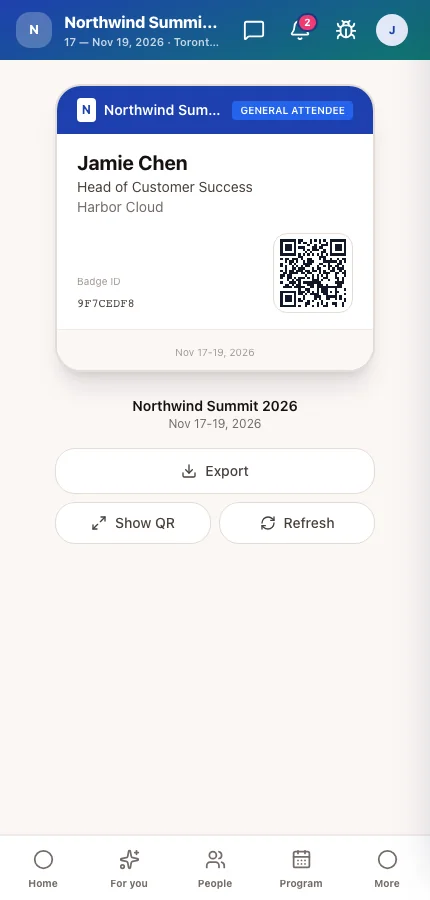
The attendee's My Badge screen shows the QR code their badge carries, once the badge has been released to them. It is the same code printed on paper and read by the scanners.
On the badge
The printed badge encodes the same value — change the code and badges printed before the change no longer match.
Tips
- Do not copy the Ticket ID into the QR Code field "to be safe" — it changes nothing on the badge and makes the record harder to read.
- If you import codes from another badging company, import them as the QR Code column so they win over any ticket ID.
- An unpaid ticket is refused at the door even when its code is right — record the payment and the same badge works. See Record payment.