
Clone an event
Most events repeat. Cloning copies the work you already did — attendee types, questions, forms, rooms, the programme, badge designs, printers, kiosks, the venue map, hotel deals and more — so the new edition starts from a working setup instead of a blank page. You choose exactly what comes across, and people and money never do, so nothing about last year's attendees leaks into this year's event.
How it works
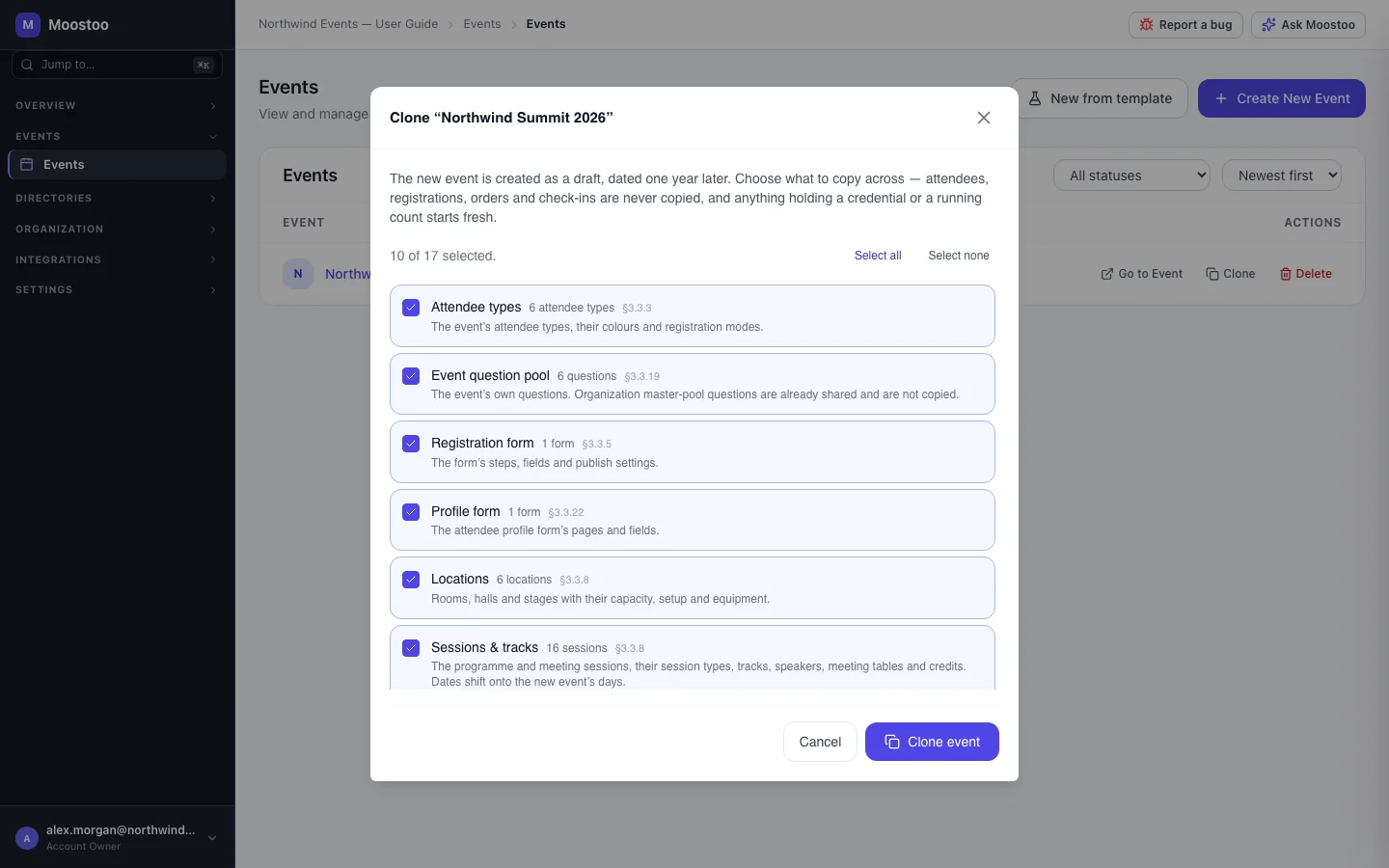
There are two ways in. From the Events list (or the organization dashboard), an event's Clone action opens a dialog: the new event is created as a draft named after the original with (Copy) on the end, dated one year later. From Create New Event, choosing Clone Existing lets you pick the source, then choose What to copy, then set the new event's name and dates yourself.
| Ticked by default | Unticked by default |
|---|---|
| Attendee types; Event question pool; Registration form; Profile form; Locations; Sessions & tracks; Venue map; Badge designs; Printers & print hubs; Kiosks; Check-in configuration; Application auto-approval rules; Travel & accommodation | Event team; Ticket types & promo codes; Automated email templates; Experience rules; Work-item types; Legal documents & consent questions; Website & app configuration |
- Some groups need others and are ticked with them. The registration and profile forms need attendee types and questions; sessions need locations; kiosks need printers; ticket types, badge designs, experience rules and auto-approval rules need attendee types. Anything that merely mentions an uncopied item is kept with that mention removed rather than pointing at last year's event.
- Dates move by whole days, from the source's first day to the new event's first day. A session on day 2 at 09:30 lands on the new day 2 at 09:30; hotel nights and deadlines shift the same way.
- Never copied: attendees, registrations, orders, tickets, check-ins, meetings, messages, notifications, campaigns and announcements, imports, invitations and any recorded consent. Organization master-pool questions are not copied either — they are already available to every event.
- Anything holding a credential or a running count starts fresh: printers and kiosks must be paired again, a ticketing-platform connection must be reconnected, invoice numbering restarts, and the event gets its own new app address.
- You are made the new event's admin whether or not you copied the event team.
- In the Ticketing & Check-in Console, only the groups that edition includes are offered.
Step by step
Clone from the Events list
Open Events and click Clone on the event you want to repeat.
Review the ticked groups. Each shows how many items it holds; untick what you do not want, or use Select all / Select none.
Ticking a group also ticks what it depends on, and says so.
Click Clone event. The copy is created as a draft called … (Copy), one year after the original.
Open the new event's Event settings and correct the name and dates.
Change the dates in Event Settings rather than editing sessions: shortening the event does not move sessions for you.
Clone while creating an event
Click Create New Event and choose Clone Existing.
Select the event to copy from.
Choose What to copy.
Enter the new name, dates and details, then create the event. Everything you chose is copied in the same step; if any group fails, you are told which one.
What attendees see
Attendees are not affected. No attendee, ticket or message is copied, and the new event is a draft that nobody can open until you publish it.
Tips
- Leave Experience rules and Automated email templates unticked the first time and review them fresh — last year's matrix often no longer fits this year's types.
- Copy Ticket types & promo codes only if prices and codes carry over; old codes would work on the new event.
- After cloning, re-pair printers, print hubs and kiosks, and reconnect any ticketing platform to the new external event.
- Only an Account Owner or Super User can clone, just as only they can create events.
Ask Moostoo
Ask Moostoo cannot clone an event, but it can help you find the one to start from.
Which events do we have?