

Free, paid, invoice or donation.
Keep Eventbrite, Swoogo, Tito or Lu.ma. Nothing to re-key.
Ten passes means ten tickets, ten names and ten scans.
Canada or the EU, with AI processing in the same region.
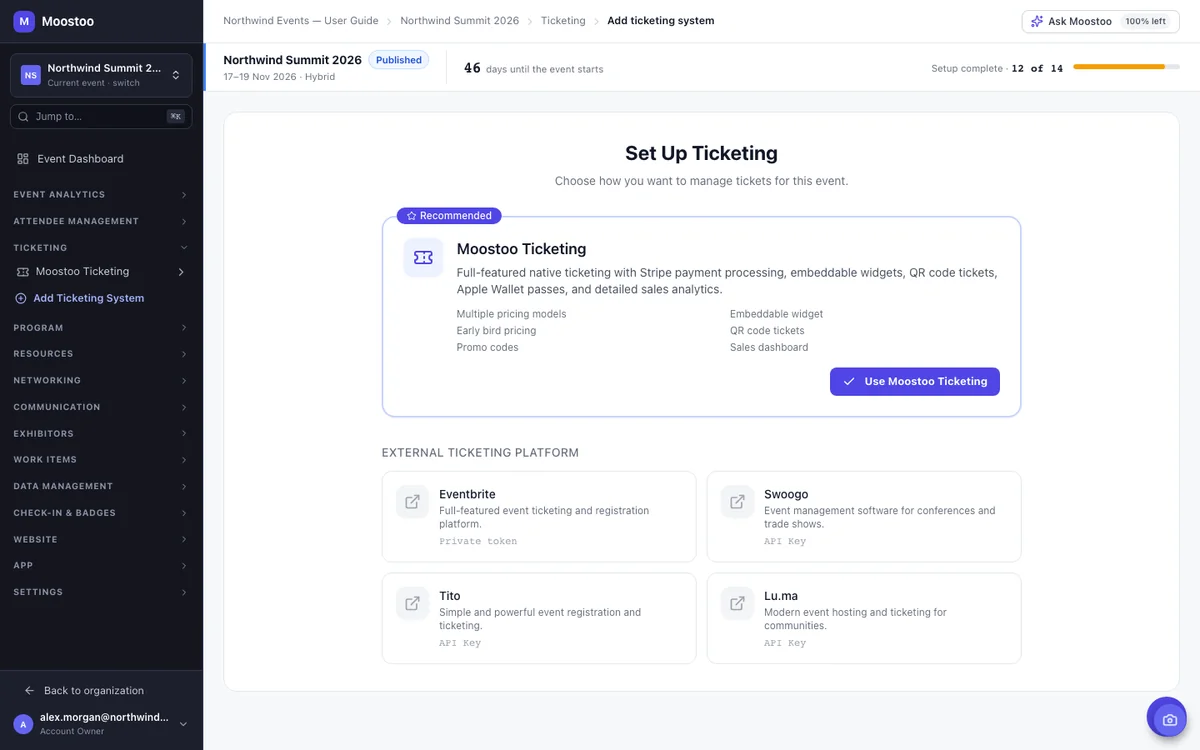
Switching ticketing halfway through a season is the last thing most organizers want, so you don't have to. Sell with Moostoo Ticketing and everything lives in one place, or connect the Eventbrite, Swoogo, Tito or Lu.ma account you already use. Ticket holders arrive in Moostoo with the right attendee type, their answers and their badge code, and live sync keeps up as new sales come in.
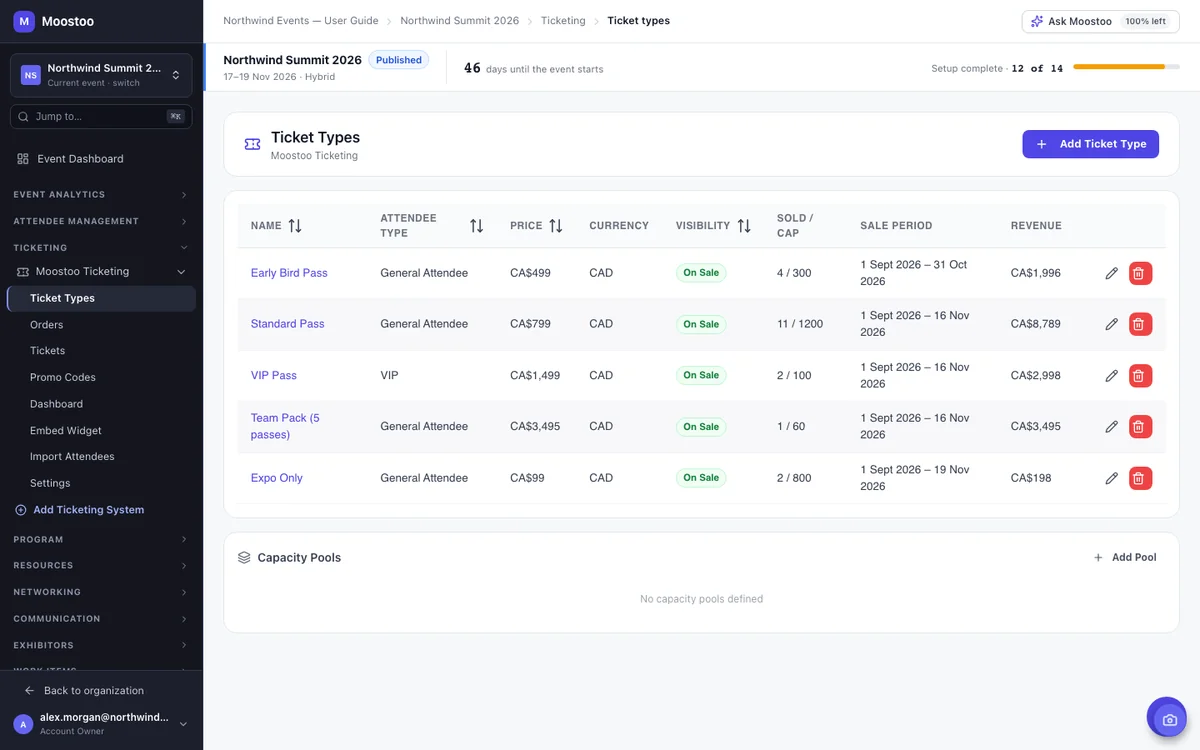
Early birds, students, VIPs, team packs, sponsor guests. Every event prices things a little differently. In Moostoo, each ticket type carries its own price, tax, capacity and sale dates, and it's linked to an attendee type. So whoever buys the VIP pass gets VIP access in the app too, meetings included.
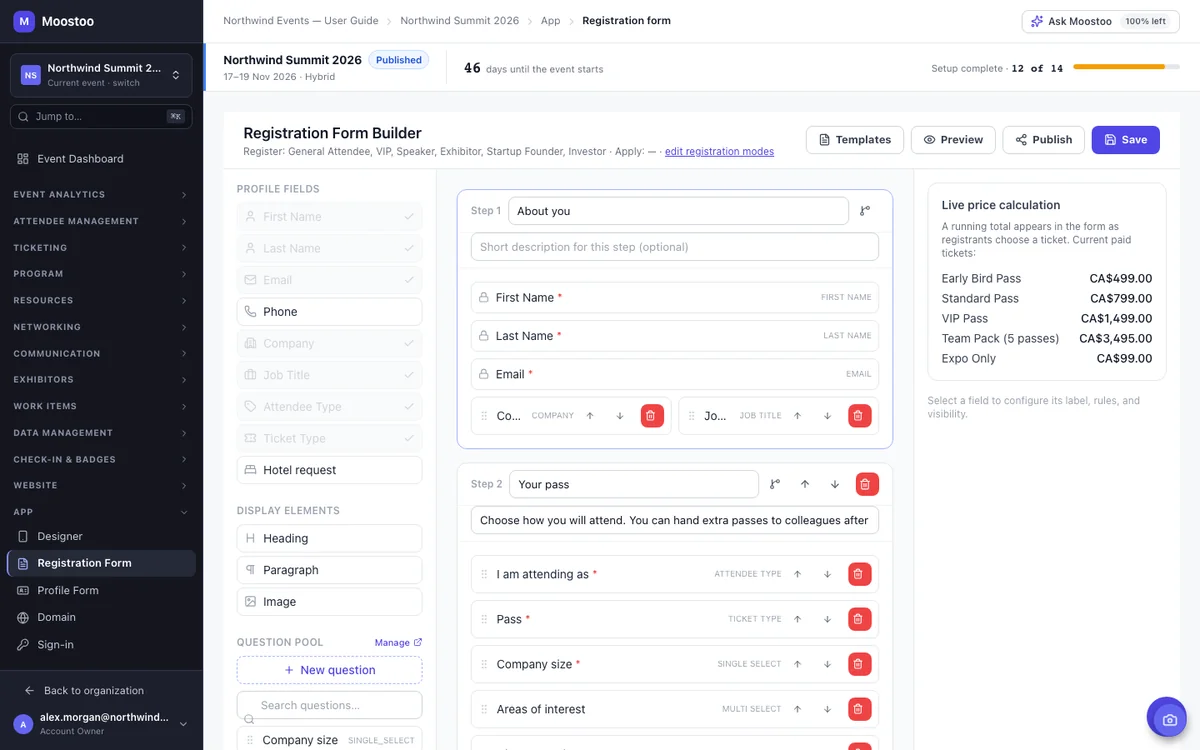
Long forms lose people. The form builder lets you break questions into short steps and decide who sees what: exhibitors get exhibitor questions, speakers get speaker questions, and a follow-up only appears when an earlier answer calls for it. Every answer lands on the attendee's profile, so it shows up in the directory, on badges and in your exports without anyone asking twice.
The office manager who buys ten passes often isn't coming, and rarely has all ten names on day one. Their confirmation email links to a private order page where they add each attendee whenever they're ready, answer the registration questions on their behalf and see what's still owed. No account, no password, and no chasing names over email.
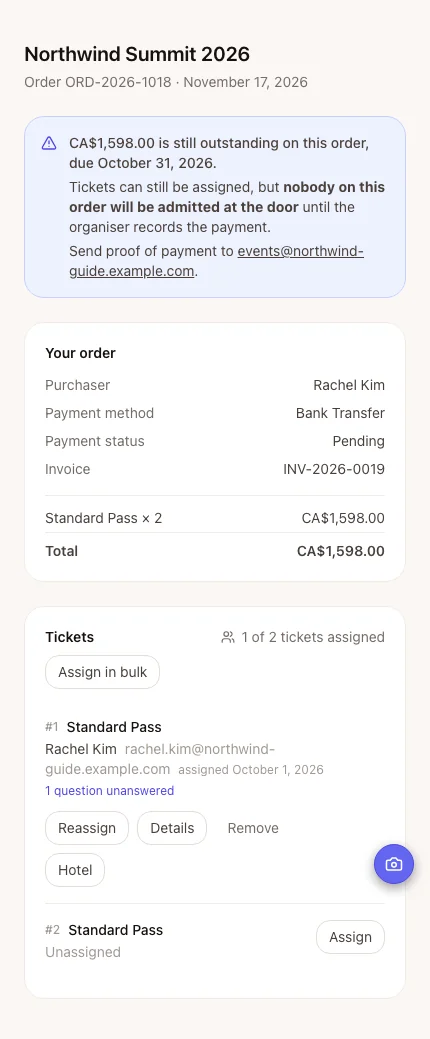
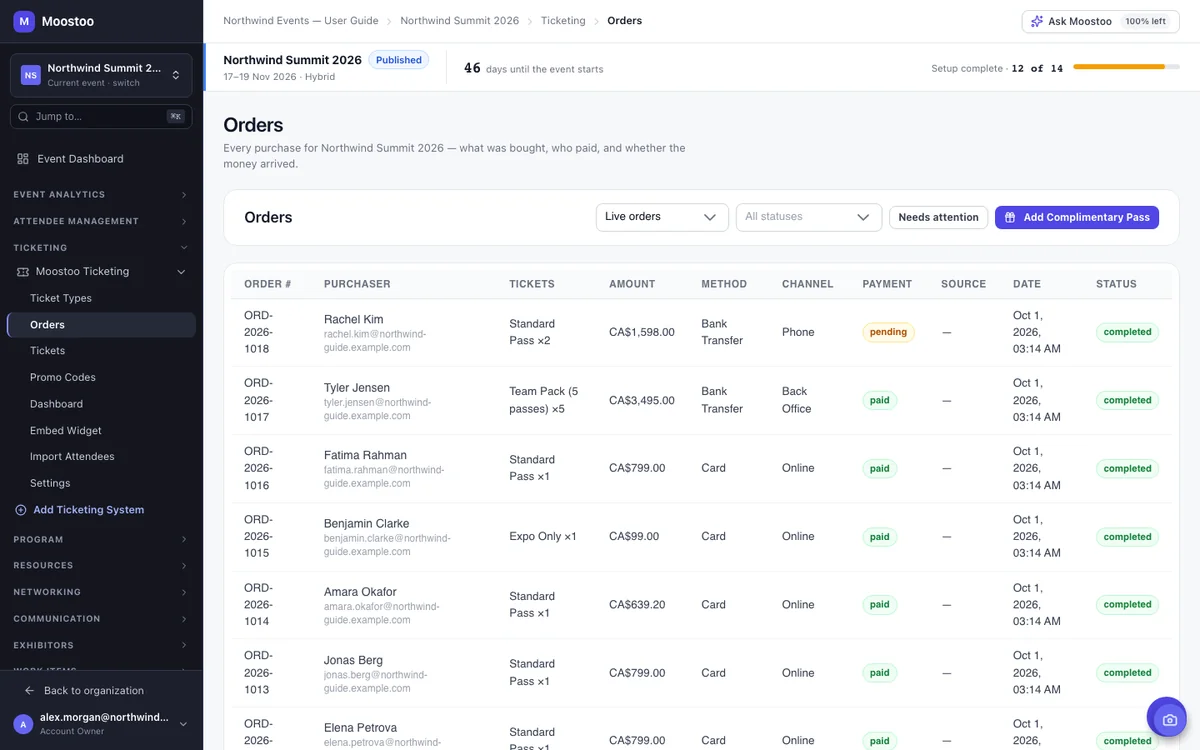
Card payments go through Stripe or another payment gateway and show up on the order automatically. For everyone else (the corporate buyer paying by bank transfer, the walk-up paying cash, the invoice that settles six weeks later) your team records the payment on the order and the buyer gets an email. Payment status has its own column, so an unpaid transfer never passes for a paid order.
Every seat gets its own ticket and QR code, so when someone scans in, Moostoo knows who they are, whether the ticket changed hands and whether it's paid for. Tickets from unpaid orders are stopped at entrance check-in, session check-in, kiosks and badge printing, with the order and the amount right on screen. Once the payment is recorded, the same badge scans in. No new ticket needed.
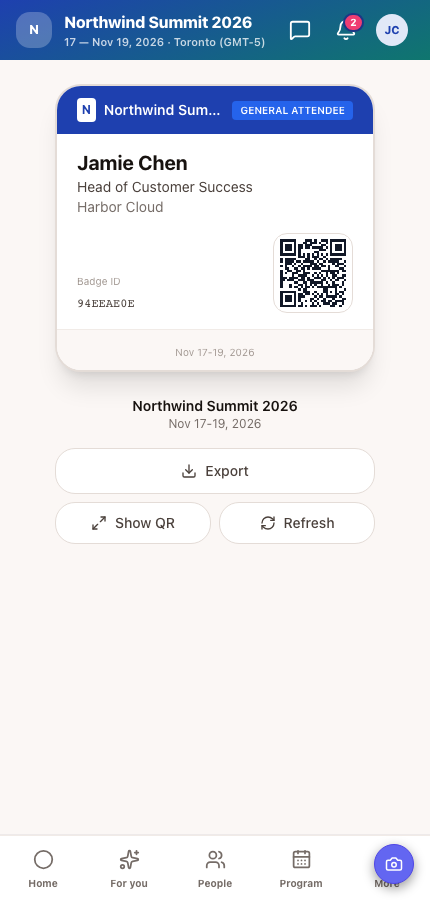
Choose Moostoo Ticketing if you want the sale, the payment and the attendee in one record you control. Stay on Eventbrite, Swoogo, Tito or Lu.ma if your buyers already know where to find you, or a partner runs the sale. Either way, you get the same attendee app, badges and check-in.
| Aspect | Moostoo Ticketing | Your Current Platform |
|---|---|---|
| Who sells the tickets | Moostoo | Eventbrite, Swoogo, Tito or Lu.ma. Moostoo reads the registrations. |
| Ticket types, orders and invoices | Managed in Moostoo | Managed in your ticketing platform |
| What scans at the door | A QR code per ticket, issued by Moostoo | The platform's own ticket ID or barcode |
| Keeping attendees up to date | One system, nothing to sync | Live sync, plus a full re-import and a history of every run |
| Writes back to the other platform | Not applicable | Never. The connection is read-only. |
| Attendee app, networking, badges and check-in |
Good to know before you connect: Lu.ma needs a calendar on Luma Plus. Only approved Lu.ma guests and complete Tito tickets come across, and cancelled or refunded Eventbrite tickets are left out. Ready to leave a platform altogether? Moostoo can bring over your past and upcoming events from Swoogo, Eventbrite or Brella. See how platform migration works →
All of them. The difference is how much more of your event you want to run in Moostoo.
Built for teams that sell tickets and run the doors, while the program and networking live somewhere else. You get ticketing, the registration form, badges, check-in, email and reporting, without screens you'd never open.
Everything in Moostoo Tickets, plus your program, AI matchmaking and meetings, exhibitors, the event website and the attendee app designer. Start small and move up when you're ready. Your data and the screens you know stay right where they are.
Selling mostly to the public through a ticket marketplace? Keep selling there and connect it to Moostoo. We don't run a public events marketplace, and we'd rather tell you that up front. Compare the plans or see how Moostoo runs in-person events.
Pick Canada (Montréal) or the EU (Frankfurt) when you set up your organization. Registrations, orders, tickets, payment records and the AI that processes them all stay in that region, backups included. That's one clear answer for your legal team, for every event you run.
On the full platform, tell Ask Moostoo what you need: “Create a VIP Pass for the VIP attendee type at 899 CAD, 50 available, on sale until October 31.” It shows you exactly what it's about to create and waits for your OK before anything changes.
Five steps, and most of them happen once, before sales open.
Decide who's coming (attendees, speakers, exhibitors, VIPs) and whether each group registers directly or applies first.
Turn on Moostoo Ticketing, or connect Eventbrite, Swoogo, Tito or Lu.ma and match their ticket types to your attendee types.
Set prices, tax, capacity and sale dates, and link each ticket to the attendee type that goes with it.
Add your questions, preview the form as each attendee type, then share the link or embed it on your site.
Switch on test mode, place a few orders, clear them out and switch test mode off. Now you're ready to open sales.
An event registration platform collects the details of the people coming to your event and keeps the attendee list up to date. When it also sells or issues the tickets, it doubles as an event ticketing platform. In Moostoo, registration also decides each person's attendee type, which controls what they can do in the event app and how they are checked in.
Yes. Connect your Eventbrite account, pick the event, and Moostoo brings in every ticket holder and keeps them in sync while sales continue. Swoogo, Tito and Lu.ma work the same way. The connection is read-only, so nothing in your ticketing account changes.
Not when you sell through your own payment gateway. Connect Stripe, Wise or another supported processor and you only pay that gateway's own processing rate.
One buyer purchases several tickets in a single order, then names each attendee from a private order page linked in their confirmation email. They can add people one at a time or upload a list, and they don't need an account to do it.
Yes, all three. Card payments go through Stripe or another payment gateway. Invoices, bank transfers, cheques and cash are recorded by your team on the order. Until a payment is recorded, that order's tickets won't scan in, so nobody gets in unpaid by accident.
Yes. Set an attendee type to Apply and its registrations arrive as applications that you approve, decline or waitlist. Auto-approval rules can let people straight in when their email domain, attendee type or an answer matches.
Yes. Every registration form has a direct link and an embed code, so you can send people to it or place it right on a page of your own site.
In the region you chose for your organization: Canada or the European Union. Orders, tickets, payment records, registrations and the AI processing for them stay in that region, including backups.
Last updated October 2026. Product details are taken from the Moostoo Admin Guide.