
Expo visits
Exhibitors want to know who they reached, and you want to show them more than the leads they scanned themselves. Expo visits puts every kind of contact between an attendee and an exhibitor side by side — in person and in the app — so you can hand each exhibitor its full list, or see which exhibitors a segment of your audience spent time with.
How it works
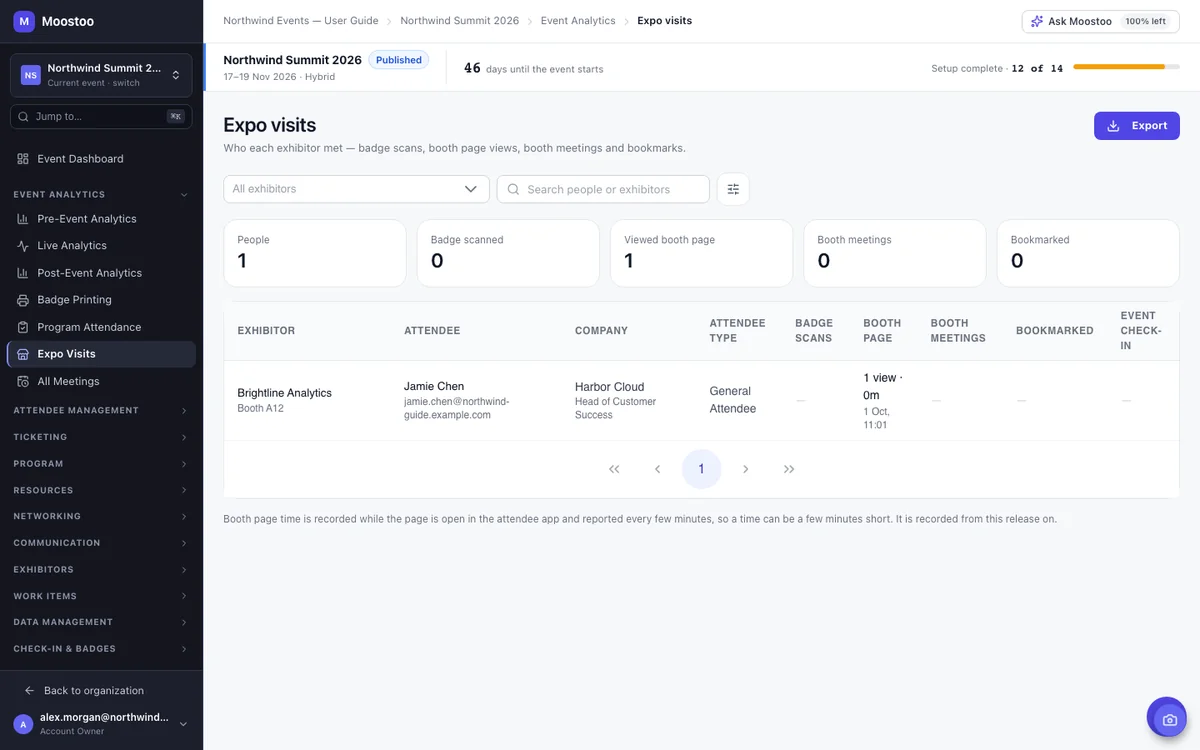
Open Event Analytics → Expo Visits. There is one row per person and exhibitor. A person appears against an exhibitor when their badge was scanned at the booth, they opened the exhibitor's booth page in the app, they had a confirmed booth meeting with it, or they bookmarked it. The exhibitor's own representatives are left out — a rep on their own booth page is not a visitor.
| Column | What it means |
|---|---|
| Badge scans | How many times the booth scanned their badge as a lead, and when last. |
| Booth page | How many times they opened the booth page in the attendee app and the total time they spent on it. |
| Booth meetings | Confirmed meetings with the booth. |
| Bookmarked | They saved the exhibitor in the app. |
| Event check-in | They came through the event's entrance. |
Step by step
Send an exhibitor its visitors
Open Event Analytics → Expo Visits.
Choose the exhibitor in the exhibitor list.
Optionally click the filter button beside the search and pick attendee types or profile answers to narrow to the audience the exhibitor paid to reach.
Read the counts under the filters — people, badge scans, booth page views, booth meetings and bookmarks — which cover exactly the rows below.
Click Export and choose CSV or Excel. The file holds every row with the same filters, each kind of visit in its own column.
Booth page time is recorded from now on
Time on a booth page is recorded by the attendee app while the page is open and in front, reported every three minutes and once more when the attendee leaves, so a time can be up to three minutes short. Visits before this was released have no page data.
What attendees see
Nothing changes for attendees. The attendee app notes when a booth page is open, which is how page time is known; nothing is shown to them and the report is visible only to your team. Exhibitors do not see this report — share the export with them if you choose to.
Tips
- Badge scans come from the booth's own lead scanning — turn lead scanning on for a booth on its page in Event companies.
- The export contains attendees' names and email addresses; share it with an exhibitor only where your privacy terms allow it.