
Privacy & legal
Collecting attendee data means being able to say what you collect, why, who processes it and for how long — and being able to prove what each person agreed to. Privacy & Legal keeps your event's legal documents in one place with a version number on every published copy, and keeps an audit trail of consent that you can export when a regulator, a sponsor's legal team or an attendee asks.
How it works
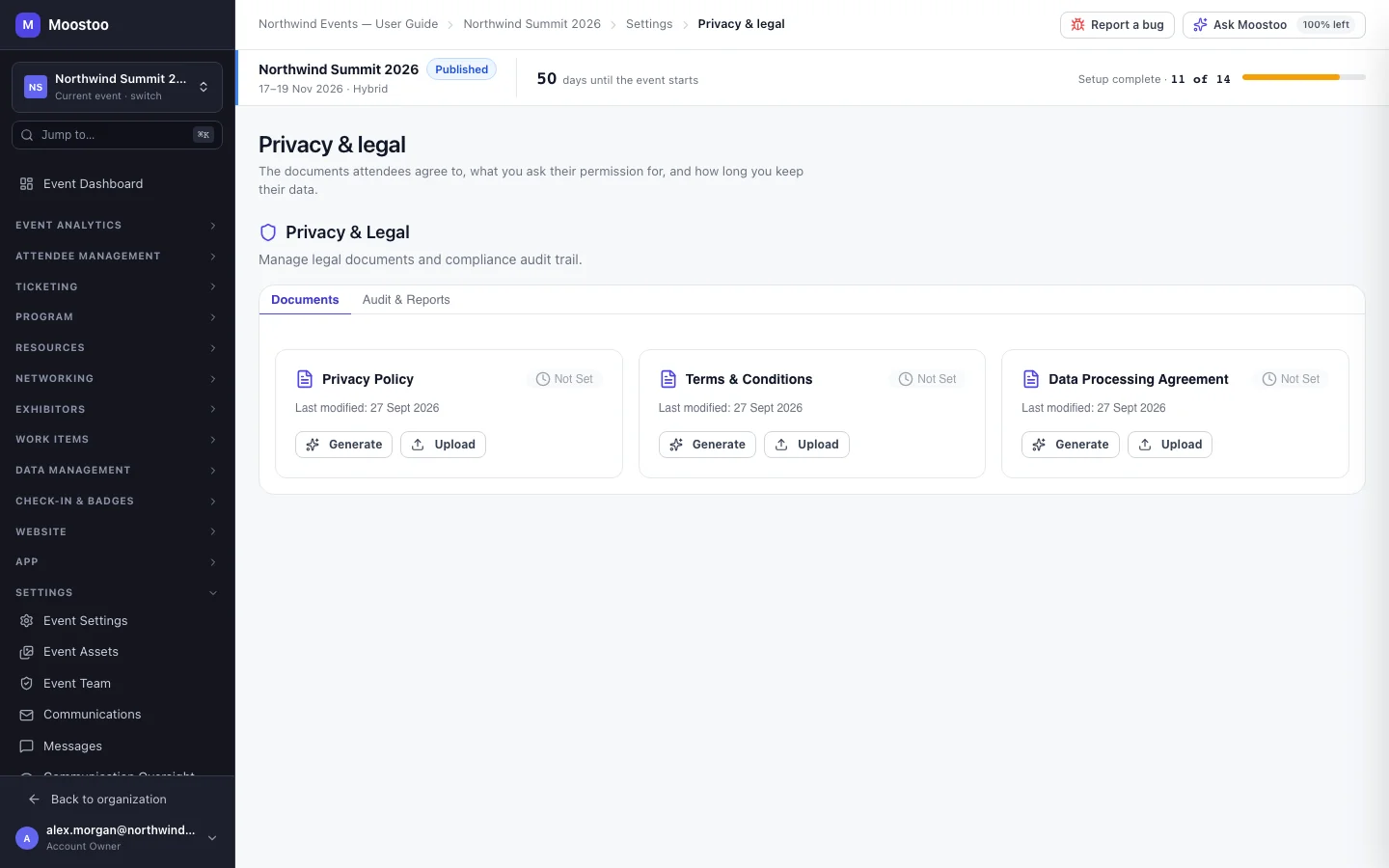
Open Settings → Privacy & Legal. The screen has two tabs: Documents and Audit & Reports. Consent statements are listed on the Consent Collection tab of Experience rules.
Documents Three cards — Privacy Policy, Terms & Conditions and Data Processing Agreement (DPA) — each showing its status (Not Set, Generated, Uploaded or Published) and version.
Generate Builds a document from a template using what you enter: organization and event name, data controller, contact email, the data you collect, the processors you use (payments, email, SMS, analytics), the retention period and the jurisdiction. You can preview it before publishing.
Upload Register your own lawyer's document instead: a PDF, DOCX or TXT file up to 10 MB. See What works today below.
Publish Makes the document the active version and increases its version number. Consent recorded earlier keeps the version it was given under.
Audit & Reports Every consent record — attendee, document, whether consent was Accepted or Withdrawn, timestamp, IP address and document version — filterable by action and date range and exportable as CSV or PDF.
- Publishing a new version after people have consented shows how many attendees consented under the previous version, and offers Send Re-consent Emails so you can ask them to agree to the new text. You can also dismiss it.
- Consent records are never edited or deleted. A withdrawal is a new record; the original acceptance stays in the trail.
- Until a privacy policy exists, the pre-launch checklist shows a warning: you should not collect attendee data without one.
What works today
Generating, previewing and publishing versioned documents works. Three parts are not finished yet: Upload records the file's name and size but does not store the file itself, so keep your own lawyer's text published somewhere you control (your website, say) as well; nothing writes consent records yet, so Audit & Reports stays empty and its exports produce no file; and Send Re-consent Emails counts the affected attendees but sends nothing. Published documents are also not yet shown to attendees in the app — link them from your website or emails.
Step by step
Publish a privacy policy
Open Settings → Privacy & Legal.
On the Privacy Policy card, click Generate — or Upload to use your own file.
For a generated document, fill in the organization, event, data controller, contact email, the data you collect, your processors, the retention period and the jurisdiction, then click Generate.
Tick only the data your forms actually collect — the policy should describe what you really do.
Review the preview, then click Publish and confirm. The card now shows Published with version 1.
Repeat for Terms & Conditions and the Data Processing Agreement if you need them.
Export a consent report
Open the Audit & Reports tab.
Filter by Action (Accepted or Withdrawn) and Date Range if you need a slice.
Click Export CSV for a spreadsheet or Export PDF for a document to hand over.
Moostoo tells you how many records the export holds. File generation is not finished yet, so no file is downloaded in this release.
What attendees see
In the attendee app
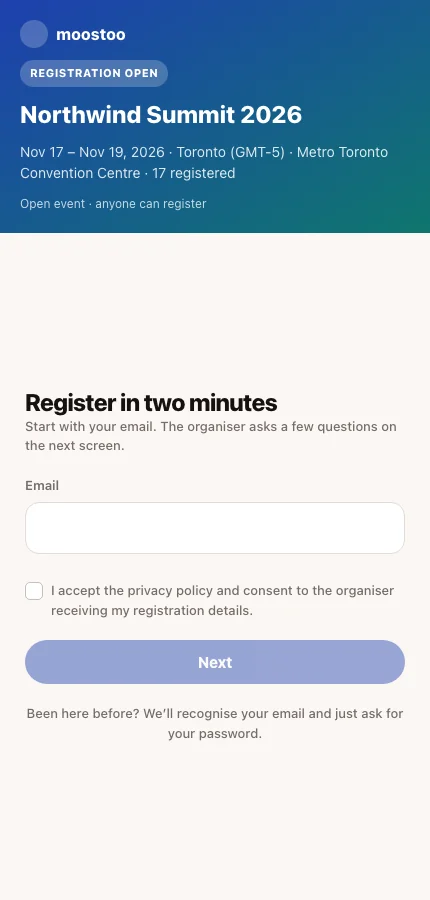
On the event's join screen, attendees tick a consent line accepting the privacy policy and agreeing to the organizer receiving their registration details. The box is never pre-ticked, and they cannot continue without it. The wording is fixed, and its privacy-policy link does not yet open the document you published here.
Tips
- Have your own counsel review a generated document before publishing. It is a well-structured starting point, not legal advice.
- Publish a new version rather than replacing the old one when the substance changes, so the version history shows what applied when.
- Until consent records are captured, keep your own record of what attendees agreed to — for example the published version number and the date you published it.
- Legal documents and consent questions can be copied into next year's edition when you clone the event.