
Email analytics
An email that bounces or is never read is information your attendees did not get. This page counts every email the event sends, so you can spot a problem early and fix the wording, timing or recipient list.
How it works
What is counted
Open Communication → Analytics. It counts every email the event has sent:
- Each automated email.
- Each campaign.
- Other event emails, such as ticket and order emails, profile reminders and notification emails.
Test sends are never counted.
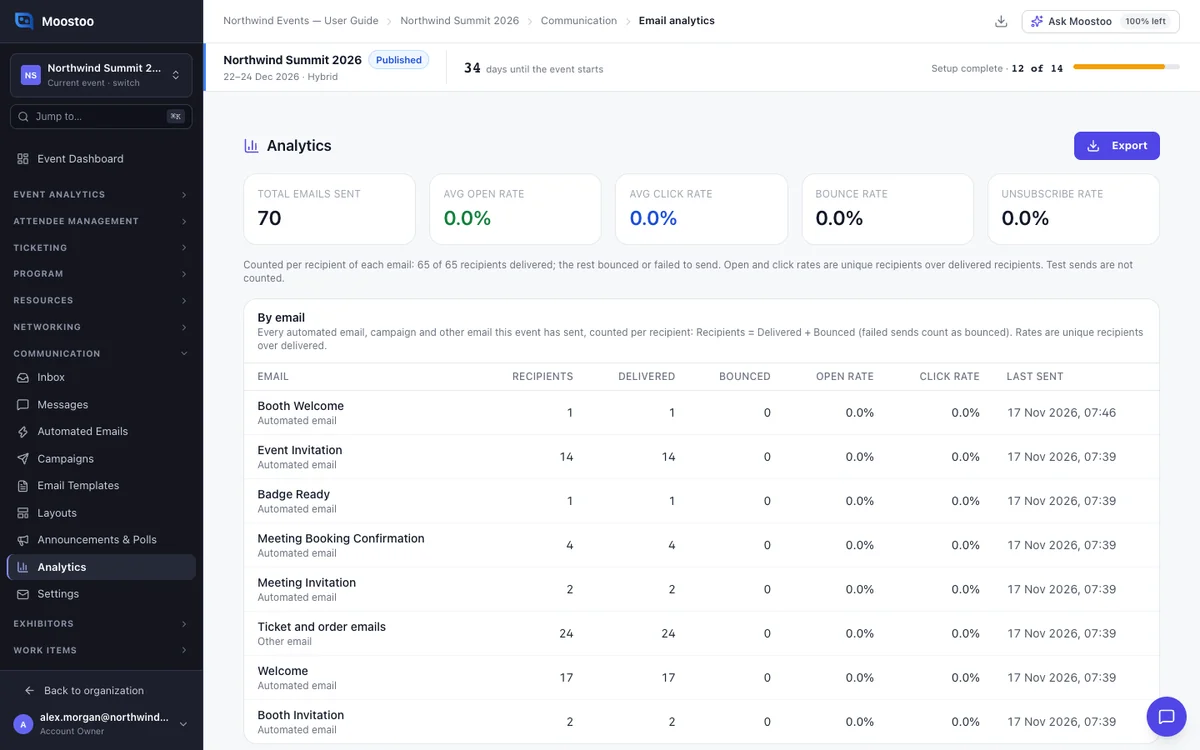
The figures
Total Emails Sent Every email that left, including a second email to the same person.
Avg Open Rate The share of people who opened the email, out of those who received it.
Avg Click Rate The share of people who clicked a link, out of those who received it.
Bounce Rate The share of people whose email bounced or could not be sent. A high rate shows a red warning.
Unsubscribe Rate The share of campaign recipients who unsubscribed.
Each person counts once for each email. If someone got the same reminder twice, they are one recipient, and delivered if either copy arrived. A bounced address cannot open anything, so it does not lower the open rate.
By email
The By email table has one row for each automated email, campaign and other kind of email. It shows recipients, delivered, bounced, open rate, click rate and when it was last sent. A row with failed sends says how many.
How opens and clicks are counted
Each email contains a tiny invisible image, which loads when the email is opened. Links pass through Moostoo first, which records the first click.
Some mail apps block images, and some open emails automatically. So open rates are a guide, not an exact count. Clicks are more reliable.
Step by step
Check how your emails are doing
Open Communication → Analytics.
Read the figures at the top.
If a red bounce warning shows, check recipient addresses before your next send.
In By email, look for emails with a low open rate or many bounces.
To download the figures, click Export, choose CSV or Excel and click Export.
The file goes to your Downloads.
To see who opened a particular campaign, open it from Communication → Campaigns.
What attendees see
Attendees see nothing of this page. The only difference is that links in event emails pass through a Moostoo address before reaching their page.
Tips
- Compare an automated email's open rate before and after you change its subject.
- Many bounces from one company usually mean its mail filter refuses you. A confirmed sender address at your own domain helps.
- Emails in a sandbox event count as sent, even though they never reach a real inbox.
- Replies are not counted here. They arrive in the Inbox.